Why GPU VRAM Matters for AI Workloads
Why VRAM becomes the bottleneck when running LLMs on a GPU, and how VRAM usage changes with parameter count and quantization level.
When running an LLM on a GPU, the resource that runs out first usually isn’t compute speed — it’s VRAM (graphics memory) capacity. Model parameters, in-flight computation results (the KV cache), and intermediate activations all have to fit in VRAM, so when VRAM runs short the model either fails to load at all or slows down dramatically.
Three things that fill up VRAM
- Model weights — size is determined by parameter count and precision.
- KV cache (key-value cache) — stores attention information for previous tokens while generating a response; it grows as the conversation and context length get longer.
- Activations and overhead — intermediate computation values produced during inference, plus the extra memory the framework itself uses.
How to calculate it: parameter count × precision
The VRAM taken up by weights can be roughly estimated as “parameter count × bytes per parameter.”
| Precision (Quantization) | Size per parameter | For a 7B model |
|---|---|---|
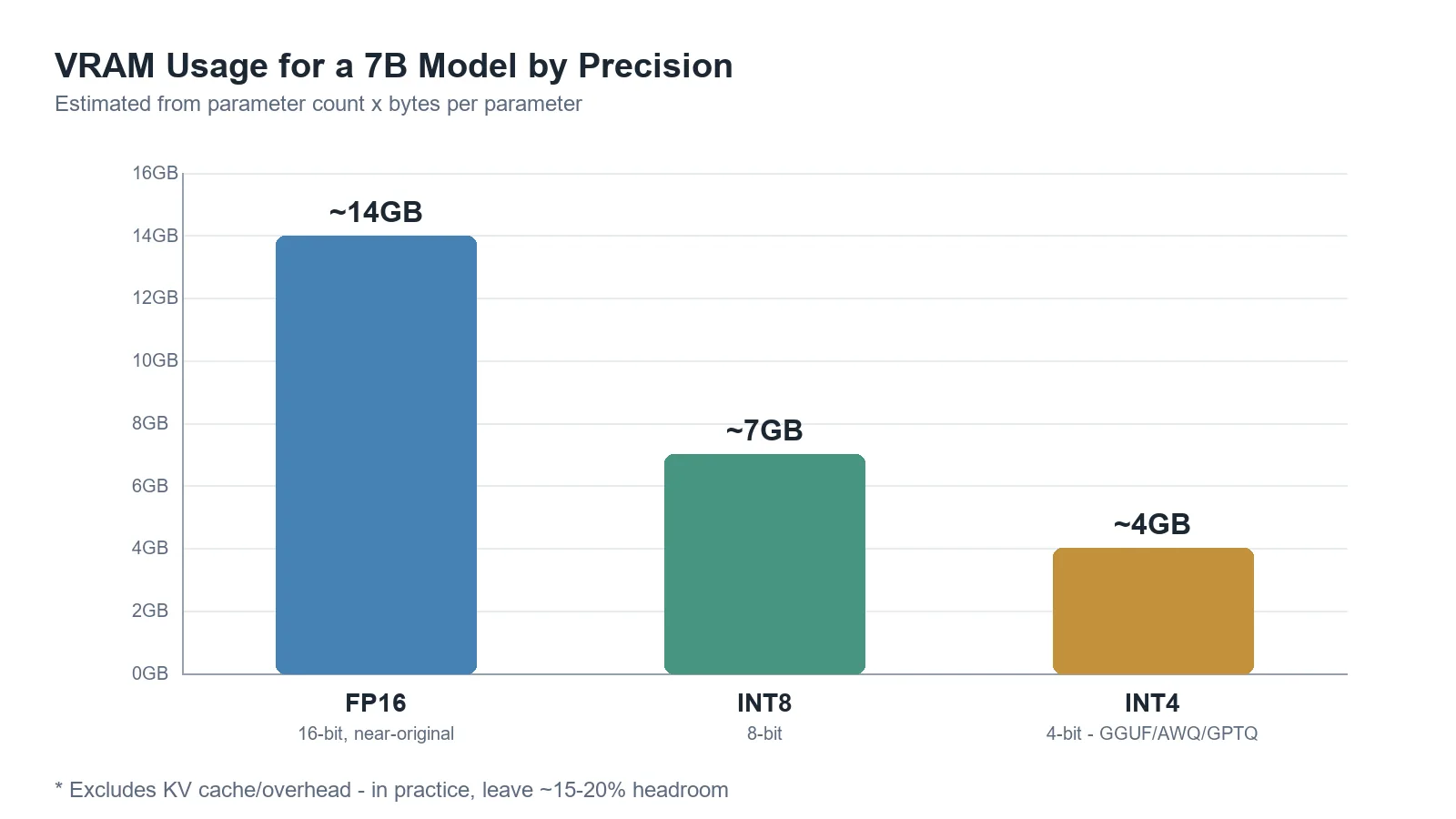
| FP16 (16-bit, close to original) | ~2GB per billion parameters | ~14GB |
| INT8 (8-bit) | ~1GB per billion parameters | ~7GB |
| INT4 (4-bit, GGUF/AWQ/GPTQ, etc.) | ~0.5GB per billion parameters | ~4GB |
On top of that, it’s safer to leave roughly 15–20% headroom for the KV cache and overhead. In other words, sizing a GPU to exactly match the model’s footprint alone can leave you short on VRAM once conversations get longer.
The chart below plots the same figures as the table above, showing how the VRAM used by weights for a 7B-parameter model shrinks as precision drops from FP16 → INT8 → INT4. Each step down roughly halves the footprint.
Rough VRAM guidelines by model size (4-bit quantization)
| Parameter count | VRAM needed (approx.) |
|---|---|
| 7B | ~8GB |
| 13B | ~12–16GB |
| 70B | ~40–48GB |
These figures assume 4-bit quantization and a typical context length; actual requirements vary with context length, the inference engine used (llama.cpp, vLLM, etc.), and batch size. For a precise number, it’s safer to plug the actual model and settings into Hugging Face’s VRAM calculator.
Why does quantization reduce VRAM
Quantization reduces the number of bits used to represent model weights. Going from FP16 to INT4 theoretically cuts weight size to a quarter. Modern 4-bit quantization schemes like GGUF, AWQ, and GPTQ deliver large memory savings while keeping quality loss minimal, making it possible to run fairly large models even on consumer GPUs. When VRAM is insufficient, part of the model can be offloaded to system RAM instead, but that comes with a significant speed trade-off.
Conclusion
When running AI models on a GPU, VRAM isn’t just a “more is better” resource — it’s the line that determines whether a model can run at all. Start by estimating rough VRAM needs from parameter count and quantization level, then choose a GPU with headroom for the context length you’ll actually use. Which GPU to actually pick is covered next in How Much VRAM Does a GPU Need for Local LLMs?.