Claude Code vs Cursor: Which Fits Your Coding Work Better?
Comparing the terminal-based agent Claude Code and the IDE-based autocomplete tool Cursor on pricing, working style, and fit for different situations.
Claude Code is an agent-style tool that takes on an entire task from the terminal, while Cursor provides real-time autocomplete and inline editing inside an IDE. Both help you code with AI, but they differ fundamentally in working style and how involved the developer stays. This article compares the two on pricing, working style, and fit for different situations.
The core difference: “hand it off” vs “work alongside it”
Describe a task to Claude Code in a sentence — “write tests for the auth module, run them, and fix any failures” — and it plans, edits, and verifies across multiple files on its own. The developer’s role becomes reviewing and approving the result.
Cursor runs inside a VS Code-based editor, predicting and autocompleting the next line as you type (Tab autocomplete) or instantly editing a selected code block (inline editing). The developer stays in the driver’s seat the whole time.
Pricing comparison
| Item | Claude Code | Cursor |
|---|---|---|
| Free plan | None (not included in the Free plan) | Hobby (free, limited Agent requests) |
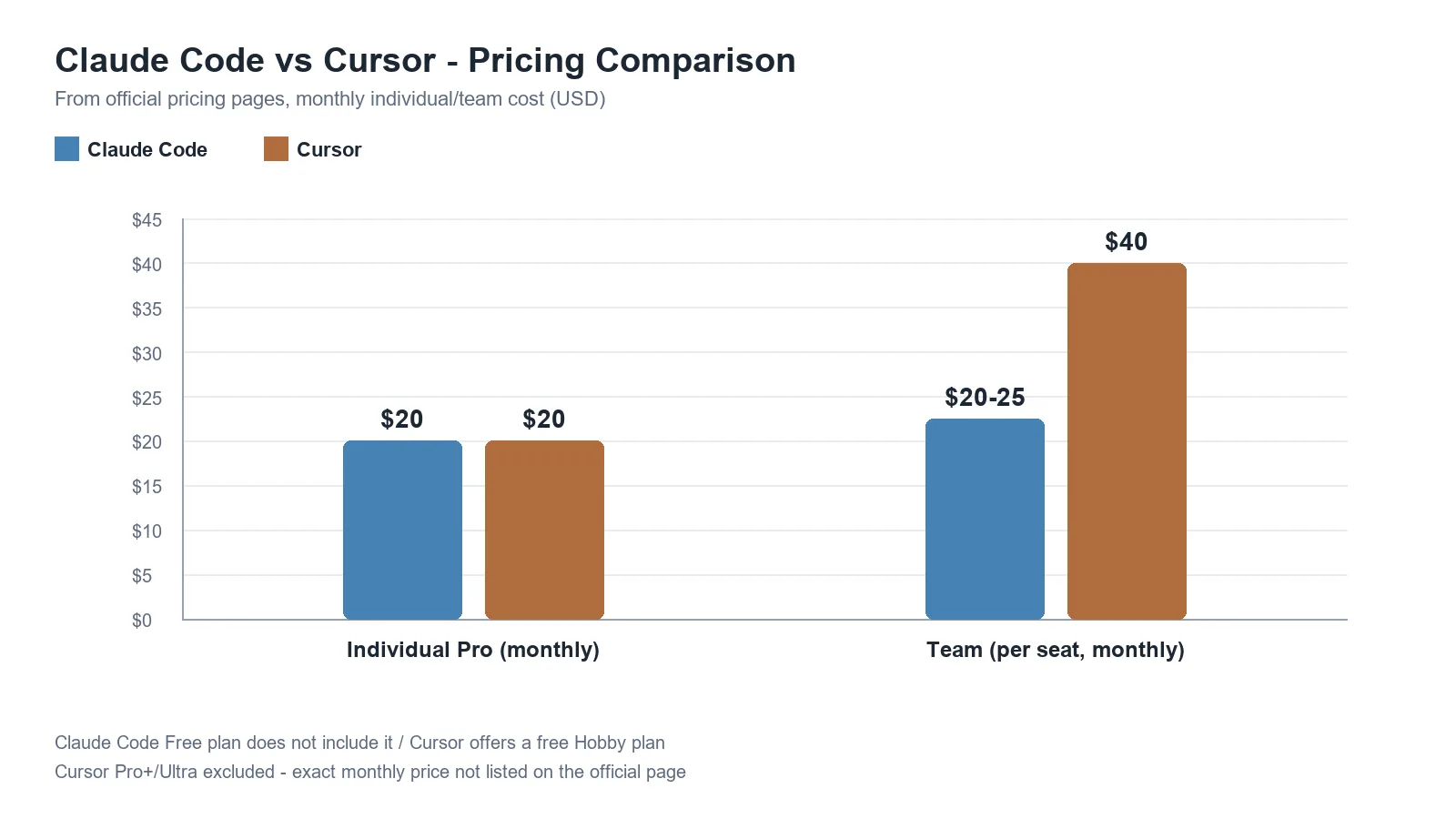
| Individual base plan | Pro $20/month (monthly) or $17/month (annual) | Pro $20/month |
| Higher individual plan | Max, from $100/month (5x/20x usage) | Pro+, Ultra (3x/20x usage vs. Pro; check the official page for current pricing) |
| Team plan | Team, $20-25/seat/month | Teams Standard $40/user/month |
| Billing model | Subscription + optional usage-based API billing | Subscription + usage-based overage |
Both tools follow a “base subscription + usage-based extra cost” structure, so actual spend can vary a lot with usage patterns. If you run large automated workloads frequently, usage billing — not the subscription fee — often ends up driving total cost.
Working style and context handling
Claude Code is widely regarded as strong at autonomous, multi-file work that requires understanding an entire codebase — large-scale refactoring, automated testing, complex project setup. Cursor, by contrast, is optimized for the developer staying in direct control, with tab autocomplete, inline edits, and a choice of models.
Some outlets report that “Claude Code supports a 1-million-token context window,” but this describes a specific model Claude Code can use (e.g. a beta feature of Sonnet 4.6) — 1M tokens doesn’t always apply across every model and every situation. Actual context capacity depends on the model and configuration in use, so if the exact figure matters, it’s safer to verify it against Anthropic’s official documentation for the specific model you’re using.
When is which tool a better fit
| Situation | Recommended tool |
|---|---|
| I want to write code directly with real-time autocomplete | Cursor |
| I want to prototype quickly while learning a new framework | Cursor |
| I want to hand off a large task entirely and just review the result | Claude Code |
| I want to automate large-scale, multi-file refactoring or repetitive debugging | Claude Code |
| I want to automate CI/CD, Git workflows, and scheduled tasks | Claude Code |
| I’m more comfortable working inside an IDE than a terminal | Cursor |
As of 2026, reports suggest many developers actually use both, splitting tasks between them. A common pattern is using Cursor’s tab autocomplete for everyday coding while reaching for Claude Code for complex autonomous work or long-running multi-agent tasks. The two tools aren’t mutually exclusive, and integrating both into a workflow is a perfectly viable option.
Limitations and caveats
- Pricing in this article reflects August 22, 2026; both companies adjust pricing fairly often, so verify against the official pages before paying.
- Cursor’s Pro+ and Ultra plans don’t show a clearly stated monthly price on the official page, so this article doesn’t state specific numbers for them.
- “Which tool is better” isn’t an absolute answer — it depends on working-style preference and project characteristics. The recommendation table above summarizes general tendencies; before committing, it’s worth trying both within their free/trial limits.
Conclusion
Claude Code and Cursor aren’t so much competitors as tools with different answers to “how much do you want to delegate.” If you want to write code directly and get fast feedback, Cursor fits better; if you’d rather hand off a whole task and review the result, Claude Code fits better. If budget and workflow allow, using both and splitting by situation is also a practical choice.