How Stereo Vision Works: Calculating Depth from Two Cameras
A walkthrough of the triangulation principle behind stereo vision, and the pipeline required to turn two camera images into depth.
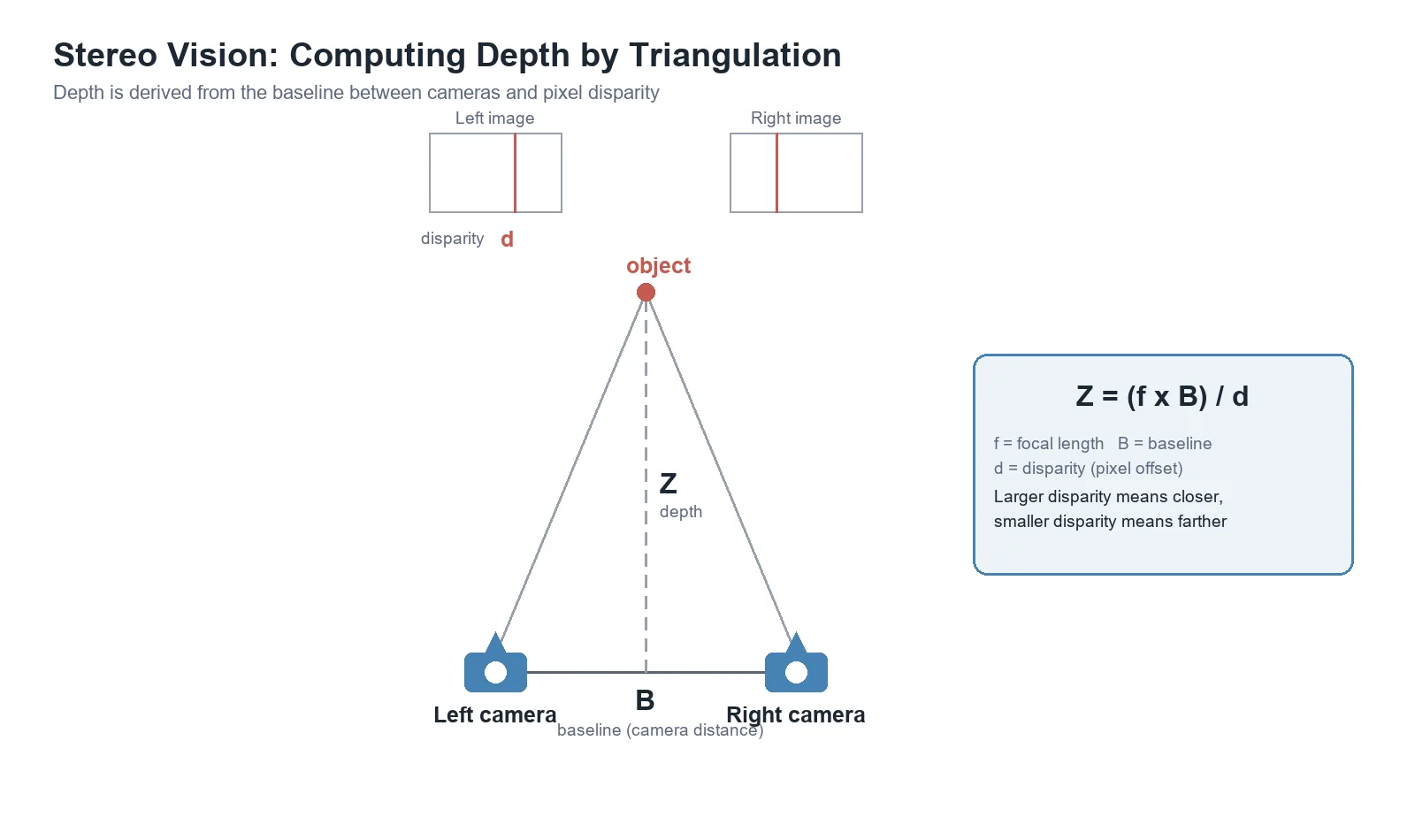
Stereo vision calculates the depth of an object using the difference (disparity) between images from two cameras placed at different positions — much like human binocular vision — without any dedicated distance sensor.
This article covers the core principle behind stereo vision, triangulation, and the processing steps required to actually compute depth.
The Core Principle: Triangulation
Suppose two cameras are placed a fixed distance apart (the baseline, B) and both look at the same point. The same 3D point lands at different pixel positions in the left and right images. That pixel difference is called disparity (d).
Using the triangle formed by the line connecting the two cameras’ optical centers and their respective lines of sight to the object, depth can be derived with the following relationship:
Z = (f × B) / dZ: distance (depth) from the camera to the objectf: the camera’s focal lengthB: the baseline — distance between the two camerasd: the disparity — pixel difference between the two images
The key property here: the larger the disparity, the closer the object; the smaller the disparity, the farther away it is. A wider baseline improves accuracy at long range, but too wide a baseline shrinks the overlapping field of view for nearby objects — a real trade-off.
The Stereo Vision Pipeline
Real systems don’t apply the formula above directly. They go through these stages first:
- Camera calibration — determining each camera’s intrinsic parameters (focal length, lens distortion) and the extrinsic parameters (relative position between the two cameras)
- Rectification — aligning both images onto the same plane so that matching points can be found with a simple horizontal search
- Stereo matching — finding corresponding pixels between the left and right images to produce a disparity map
- Triangulation — converting the disparity map into actual depth (Z) using the calibration data
A Minimal Implementation (OpenCV)
Below is a minimal example that computes a disparity map from already-calibrated left/right images. A real project needs the calibration step first.
import cv2

left = cv2.imread("left.png", cv2.IMREAD_GRAYSCALE)
right = cv2.imread("right.png", cv2.IMREAD_GRAYSCALE)

stereo = cv2.StereoSGBM_create(
    minDisparity=0,
    numDisparities=64,   # must be a multiple of 16
    blockSize=7,
)

disparity = stereo.compute(left, right).astype("float32") / 16.0
# values near 0 indicate distant objects; larger values indicate closer objects
Not runtime-verified: this snippet demonstrates the OpenCV
calib3d/StereoSGBMAPI, but its output hasn’t been verified with real calibration parameters or images. Parameter names may differ across OpenCV versions.
Limitations and Caveats
- Low-texture surfaces (like a blank white wall) make correspondence matching difficult, degrading disparity accuracy.
- Lighting changes, reflections, and occlusion increase error in affected regions.
- The maximum measurable distance and precision depend on baseline and camera resolution.
- Stereo vision depends heavily on the quality of the two cameras’ calibration.
Conclusion
Stereo vision obtains distance information from just two cameras, with no dedicated depth sensor — which is why it’s used across robotics, autonomous driving, and 3D reconstruction. The core task is computing disparity between the two images accurately, and that requires calibration and rectification as prerequisite steps.